Build Squid Game's Marble Guessing Game using Flutter and WebSocket.

In this tutorial, we'll create a mobile client for the game that we created last time. We'll need the back-end server from that project so go ahead and clone the repo from GitHub.
Prerequisites
- Flutter installed on your machine.
- Clone of the back-end app repo.
Create a new Flutter project
Let's start by creating a new flutter project.
- Open a terminal in the location where you want your project to be stored.
- Type the following command:
flutter create marbles_mobile
- Open the project in an IDE of your choice.
Dependencies
We'll need to add a few dependencies to our project:
- Stomp dart client: To connect to the back-end server via WebSocket. Type the following command in any location inside the project directory:
flutter pub add stomp_dart_client
- HTTP: To send HTTP requests to the server.
flutter pub add http
- UUID: To validate game Ids.
flutter pub add uuid
- Google Fonts (Optional): To add fonts.
flutter pub add google_fonts
Now that we have everything in place we can begin writing our application. So let's navigate to the lib directory and get started.
main.dart
The main.dart is straightforward as it only acts as the entry point to our application. I've cleaned up the boilerplate code provided by Flutter and simply added a title and set the home widget to HomePage which we'll define soon.
import 'package:flutter/material.dart';

import 'page/home_page.dart';

void main() {
  runApp(const MyApp());
}

class MyApp extends StatelessWidget {
  const MyApp({Key? key}) : super(key: key);

  @override
  Widget build(BuildContext context) {
    return MaterialApp(
      title: 'Marbles',
      theme: ThemeData(
        primarySwatch: Colors.blue,
      ),
      home: const HomePage(),
    );
  }
Game Model
Before we create our home page let's define the game model that will store our game state. We'll receive the game state from our WebSocket endpoint as a JSON payload and then we'll decode it to create our game object.
- Create a new package in the
libdirectory and name itmodel. - Create
game.dartin themodelpackage. - Add the following code.
class Game {
  final String gameId;
  final String status;
  final String player1;
  final String? player2;
  final int stake1;
  final int stake2;
  final String turn;
  final String move;
  final int hidden;
  final int bet;
  final String? winner;

  const Game(
      {required this.gameId,
      required this.status,
      required this.player1,
      required this.player2,
      required this.stake1,
      required this.stake2,
      required this.turn,
      required this.move,
      required this.hidden,
      required this.bet,
      required this.winner});

  static Game fromJson(json) => Game(
      gameId: json['gameId'],
      status: json['status'],
      player1: json['player1'],
      player2: json['player2'],
      stake1: json['stake1'],
      stake2: json['stake2'],
      turn: json['turn'],
      move: json['move'],
      hidden: json['hidden'],
      bet: json['bet'],
      winner: json['winner']);
}
- The
gameIdfield stores the id of the game the player is playing. statusdefines the game status which can beNEW,IN_PROGRESSorENDED.player1andplayer2store the usernames of the players playing the game. Notice that player2 is nullable as when a new game is created player2 remains null until someone joins the game.stake1andstake2specify the number of marbles held by players one and two respectively.turndefines whose turn it is to play. It can be eitherPLAYER_1orPLAYER_2.movespecifies the move that's expected to be played. It can beHIDE,BETorGUESS.- Integers
hidandbetstore the number of marbles hidden and bet by the players in that round. winnerstores the name of the player that won the game. It's null until someone wins the game.- Then we define the constructor for the game object.
fromJsonis a static method that returns a Game object by passing a json object to it. We'll be using this method to extract the game state from the responses sent by our server.
Now let's define our home page.
Home Page
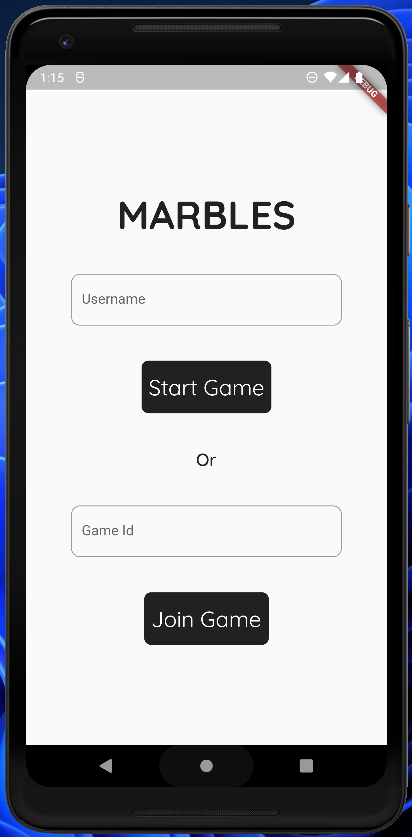
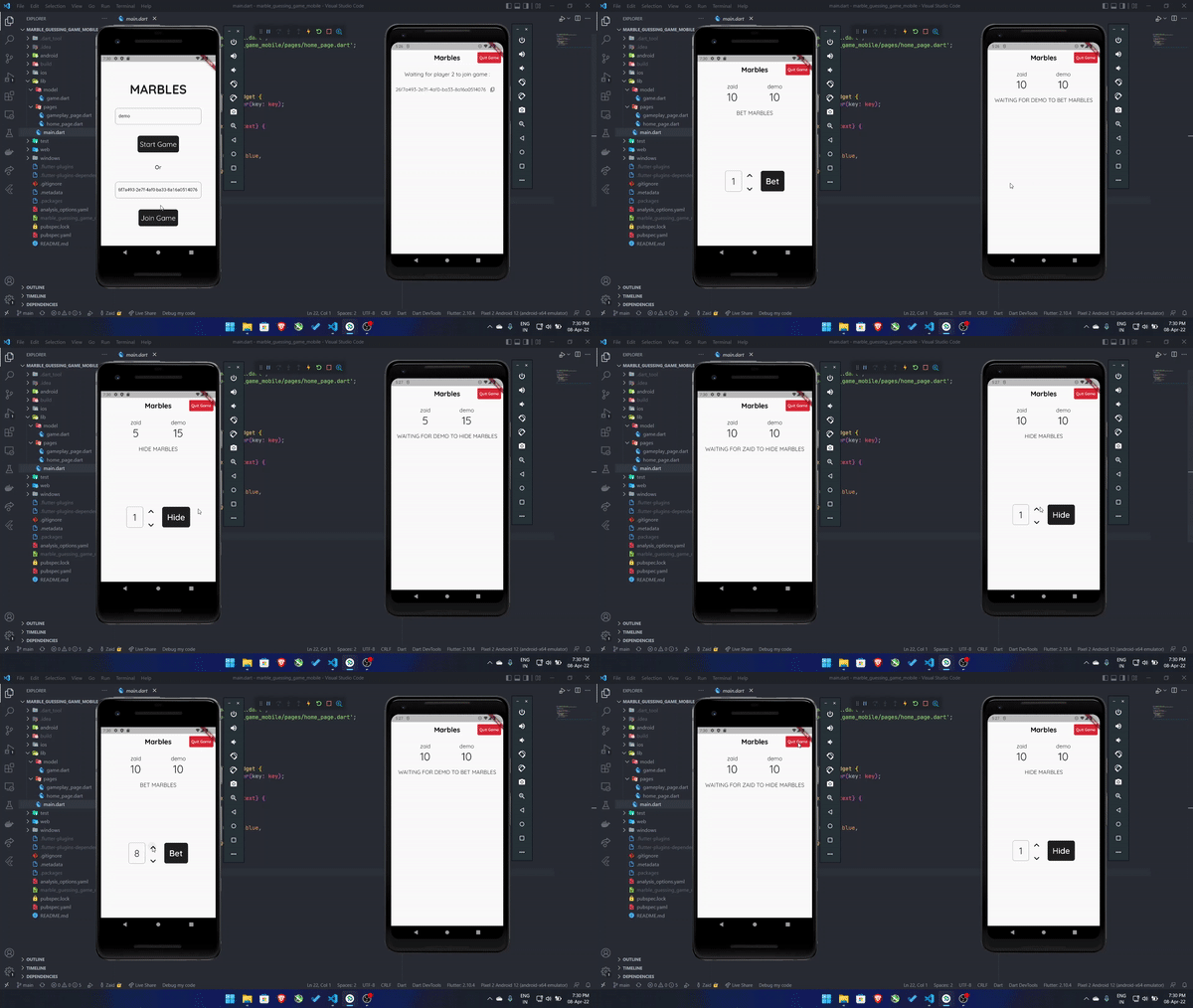
On launching the app users will be presented with our home page (screenshot in the screenshots section) where they can either start a new game or join an existing game by providing a valid gameId.
- Create a new package in the
libdirectory and name itpage. - Create a new file
home_page.dartin thepagepackage. - Add the following code and save.
import 'dart:convert';

import 'package:flutter/material.dart';
import 'package:google_fonts/google_fonts.dart';
import 'package:uuid/uuid.dart';
import 'package:http/http.dart' as http;

import '../model/game.dart';
import 'gameplay_page.dart';

class HomePage extends StatefulWidget {
  const HomePage({Key? key}) : super(key: key);

  @override
  State<HomePage> createState() => _HomePageState();
}

class _HomePageState extends State<HomePage> {
  final String _baseUrl = '10.0.2.2:8080';

  late TextEditingController _usernameEditingController;
  late TextEditingController _gameIdEditingController;
  bool _isValidUsername = true;
  bool _isValidGameId = true;
  String? _username;
  String? _gameId;

  final ButtonStyle _buttonStyle = TextButton.styleFrom(
    textStyle: GoogleFonts.quicksand(
      fontSize: 25,
    ),
    shape: RoundedRectangleBorder(
      borderRadius: BorderRadius.circular(8.0),
    ),
    minimumSize: const Size(120.0, 60.0),
    primary: Colors.white,
    backgroundColor: Colors.black87,
  );

  Future<http.Response> _createGame(String username) async {
    return await http.post(Uri.http(_baseUrl, 'api/v1/create'),
        headers: Map<String, String>.of({'player': _username!}));
  }

  Future<http.Response> _joinGame(String username, String gameId) async {
    return await http.post(Uri.http(_baseUrl, 'api/v1/join/$gameId'),
        headers: Map<String, String>.of({'player': _username!}));
  }

  @override
  void initState() {
    super.initState();
    _usernameEditingController = TextEditingController();
    _gameIdEditingController = TextEditingController();
  }

  @override
  void dispose() {
    super.dispose();
    _usernameEditingController.dispose();
    _gameIdEditingController.dispose();
  }

  @override
  Widget build(BuildContext context) {
    final _width = MediaQuery.of(context).size.width;

    return Scaffold(
      body: SafeArea(
        child: Center(
          child: SingleChildScrollView(
            reverse: true,
            child: Column(
              crossAxisAlignment: CrossAxisAlignment.center,
              children: [
                //Game Title
                Text(
                  'MARBLES',
                  style: GoogleFonts.quicksand(
                      fontSize: 45, fontWeight: FontWeight.bold),
                ),

                const SizedBox(
                  height: 40.0,
                ),

                //Username Text Field
                SizedBox(
                  width: _width * 0.75,
                  child: TextField(
                    controller: _usernameEditingController,
                    keyboardType: TextInputType.name,
                    onChanged: (name) {
                      //Validate username
                      RegExp exp = RegExp(r"^[a-z0-9_-]{3,15}$");
                      if (exp.hasMatch(name)) {
                        setState(() {
                          _isValidUsername = true;
                        });
                      } else {
                        setState(() {
                          _isValidUsername = false;
                        });
                      }
                      //If username is valid update state
                      if (_isValidUsername) {
                        setState(() {
                          _username = name;
                        });
                      } else {
                        setState(() {
                          _username = null;
                        });
                      }
                    },
                    decoration: InputDecoration(
                      border: OutlineInputBorder(
                          borderRadius: BorderRadius.circular(10.0)),
                      hintText: 'Username',
                      errorText: _isValidUsername ? null : 'Invalid username',
                    ),
                  ),
                ),

                const SizedBox(
                  height: 40.0,
                ),

                //Start Game Button
                TextButton(
                  onPressed: () async {
                    //Check if valid username is present
                    if (_isValidUsername && _username != null) {
                      //Send request to create game
                      var response = await _createGame(_username!);
                      //If request is successful then get game id and navigate to gameplay page
                      if (response.statusCode == 200) {
                        String gameId = response.body
                            .replaceAll('$_username started a new game: ', '');
                        Navigator.of(context).pushReplacement(
                          MaterialPageRoute(
                            builder: (context) => GameplayPage(
                              gameId: gameId,
                              player: _username!,
                              gamestate: Game(
                                  gameId: gameId,
                                  status: 'NEW',
                                  player1: _username!,
                                  player2: null,
                                  stake1: 10,
                                  stake2: 10,
                                  turn: 'PLAYER_1',
                                  move: 'HIDE',
                                  hidden: 0,
                                  bet: 0,
                                  winner: null),
                            ),
                          ),
                        );
                      }
                    } else {
                      //Show error text if username is invalid
                      setState(() {
                        _isValidUsername = false;
                      });
                    }
                  },
                  child: const Text('Start Game'),
                  style: _buttonStyle,
                ),

                const SizedBox(
                  height: 40.0,
                ),

                Text(
                  'Or',
                  style: GoogleFonts.quicksand(
                      fontSize: 20, fontWeight: FontWeight.w500),
                ),

                const SizedBox(
                  height: 40.0,
                ),

                //Game Id Text Field
                SizedBox(
                  width: _width * 0.75,
                  child: TextField(
                    keyboardType: TextInputType.text,
                    controller: _gameIdEditingController,
                    onChanged: (gameId) {
                      //Check if game id is valid
                      try {
                        Uuid.parse(gameId);
                        setState(() {
                          _isValidGameId = true;
                        });
                      } on FormatException {
                        setState(() {
                          _isValidGameId = false;
                        });
                      }
                      //If valid then update state
                      if (_isValidGameId && gameId.isNotEmpty) {
                        setState(() {
                          _gameId = gameId;
                        });
                      } else {
                        setState(() {
                          _gameId = null;
                        });
                      }
                      //If game id is deleted then update state and remove error text
                      if (gameId.isEmpty) {
                        setState(() {
                          _isValidGameId = true;
                          _gameId = null;
                        });
                      }
                    },
                    decoration: InputDecoration(
                        border: OutlineInputBorder(
                            borderRadius: BorderRadius.circular(10.0)),
                        hintText: 'Game Id',
                        errorText: _isValidGameId ? null : 'Invalid Game id'),
                  ),
                ),

                const SizedBox(
                  height: 40.0,
                ),

                //Join Game Button
                TextButton(
                  onPressed: () async {
                    //Check if valid username and game id are present
                    if (_isValidUsername && _username != null) {
                      if (_isValidGameId && _gameId != null) {
                        //Send join game request
                        var response = await _joinGame(_username!, _gameId!);
                        if (response.statusCode == 200) {
                          //If request is successful then get game id and navigate to gameplay page
                          Game gamestate =
                              Game.fromJson(jsonDecode(response.body));

                          Navigator.of(context).pushReplacement(
                            MaterialPageRoute(
                              builder: (context) => GameplayPage(
                                gameId: gamestate.gameId,
                                player: _username!,
                                gamestate: gamestate,
                              ),
                            ),
                          );
                        }
                      } else {
                        //Show error text if button is tapped without game id
                        setState(() {
                          _isValidGameId = false;
                        });
                      }
                    } else {
                      //Show error text if button is tapped without username
                      setState(() {
                        _isValidUsername = false;
                      });
                    }
                  },
                  child: const Text('Join Game'),
                  style: _buttonStyle,
                ),
              ],
            ),
          ),
        ),
      ),
    );
  }
}
Now let's walk through the code above.
- Our
HomePagewidget is a stateful widget as we need to rebuild it depending on user input. _baseUrldeclares the base URL on which our back-end server is running. The server is running onlocalhost:8080but the local host for the android emulator is at10.0.2.2therefore the base URL becomes10.0.2.2:8080.
Note: If you are using your device to run the application in debug mode, you'll have to specify the IPv4 address on your machine on which the server is running and make sure that both devices are on the same network.
- We have two text fields so we declare two
TextEditingControllers i.e._usernameEditingControllerfor username text field and_gameIdEditingControllerforgameIdfield. We'll need these to get the text from the text fields and to perform validation. _isValidUsernameand_isValidGameIdare booleans that we'll set to true when the user has entered valid inputs to our fields._usernameand_gameIdwill store the username andgameIdwhich we'll need to send to our server._buttonStyledefines the style for our text buttons. It's merely for cosmetic purposes and I've extracted it here to avoid typing it twice. I'll simply pass this variable as a reference for the style attribute in both buttons._createGameand_joinGameare methods that sendHTTP POSTrequests to our server when the user presses the start game or join game button. We have imported thehttppackage that we added as a dependency earlier to send these requests.
import 'package:http/http.dart' as http;
We are passing the username of the player as a request header as required by our server.
- In the
initStateanddisposemethods we instantiate and dispose ourTextEdititingControllers. It's important to dispose of our controllers to release the memory allocated to them and avoid memory leakage.
Inside the build method
The build method contains the bulk of our code as here we define the widget tree that the user will see on their screen. Whenever we update the state, the build method will run and the widget tree will be updated to show the updated UI.
Textwidget is used to show the title of the game.- The first
TextFieldwill take the username as input. We assign the_usernameEditingControllerto it. TheonChangedproperty takes a method that we'll use to perform validation. We check if the username entered by the user matches the pattern provided by us and if yes we update_isValidUsernameto true and set_usernameto the username entered. If the user enters an invalid username we provide error text using theerrorTextproperty. - Next, we have the start game button. In the
onPressedmethod, we check if a valid username is present. If present, we send the_createGamerequest to the server and pass the username as a parameter. If we receive a status code 200 from the server we create a newGameobject and then navigate to the gameplay page. - The next text field takes a
gameIdas input. Users will have to provide both the username andgameIdto join an existing game. We attach ourgameIdEditingControllerto it. In theonChangedmethod we validate thegameIdprovided by parsing it as a UUID. If thegameIdis valid then we update the state. If the user edits thegameIdfield and then deletes it we reset the_isValidGameIdto true to avoid showing error text on an empty text field asgameIdis not mandatory to start a new game. - Finally, we have the join game button. If we have a valid username and
gameIdwe send the_joinGamerequest and upon receiving a status code 200 response we create our Game object by parsing the response into a JSON object and passing it to ourfromJsonmethod. Once we have our game state we navigate to the gameplay page. If the join game button is pressed without a valid username or id we update the state to show error text.
Gameplay Page
Whenever a user starts a new game or joins an existing game they are navigated to the gameplay page that we have defined in the page package as gameplay_page.dart.
import 'dart:convert';
import 'dart:io';
import 'package:flutter/material.dart';
import 'package:flutter/services.dart';
import 'package:google_fonts/google_fonts.dart';
import 'package:stomp_dart_client/stomp.dart';
import 'package:stomp_dart_client/stomp_config.dart';
import 'package:stomp_dart_client/stomp_frame.dart';
import 'package:http/http.dart' as http;
import '../model/game.dart';
import 'home_page.dart';
class GameplayPage extends StatefulWidget {
final String gameId;
final String player;
final Game gamestate;
const GameplayPage(
{Key? key,
required this.gameId,
required this.player,
required this.gamestate})
: super(key: key);
@override
State<GameplayPage> createState() => _GameplayPageState();
}
class _GameplayPageState extends State<GameplayPage> {
final String _baseUrl = '10.0.2.2:8080';
late StompClient stompClient;
late Game? game;
late String playerId;
int count = 0;
//Requests to server
//Hide marbles
Future<http.Response> _hide(int count) async {
return await http.post(
Uri.http(_baseUrl, 'api/v1/' + widget.gameId + '/hide'),
headers: {
'player': widget.player,
HttpHeaders.contentTypeHeader: "application/json",
},
body: jsonEncode({"count": count}),
);
}
//Bet marbles
Future<http.Response> _bet(int count) async {
return await http.post(
Uri.http(_baseUrl, 'api/v1/' + widget.gameId + '/bet'),
headers: {
'player': widget.player,
HttpHeaders.contentTypeHeader: "application/json",
},
body: jsonEncode({"count": count}),
);
}
//Guess marbles
Future<http.Response> _guess(String guess) async {
return await http.post(
Uri.http(_baseUrl, 'api/v1/' + widget.gameId + '/guess'),
headers: {
'player': widget.player,
HttpHeaders.contentTypeHeader: "application/json",
},
body: jsonEncode({"guess": guess}),
);
}
//Quit game
Future<http.Response> _quit() async {
return await http.post(
Uri.http(_baseUrl, 'api/v1/' + widget.gameId + '/quit'),
headers: {'player': widget.player},
);
}
//Restart game
Future<http.Response> _restart() async {
return await http.post(
Uri.http(_baseUrl, 'api/v1/' + widget.gameId + '/restart'),
headers: {'player': widget.player},
);
}
@override
void initState() {
super.initState();
//Set up STOMP client
stompClient = StompClient(
config: StompConfig.SockJS(
url: 'http://10.0.2.2:8080/game',
onConnect: onConnect,
),
);
stompClient.activate();
game = widget.gamestate;
//Set player id
if (game!.player2 == null) {
playerId = 'PLAYER_1';
} else {
playerId = 'PLAYER_2';
}
}
@override
void dispose() {
stompClient.deactivate();
super.dispose();
}
//When the client is connected, subscribe to the topic
onConnect(StompFrame frame) {
stompClient.subscribe(
destination: '/topic/gamestate/' + widget.gameId,
callback: (StompFrame frame) {
//Get the response and convert it into Game object and set state
final gameState = jsonDecode(frame.body!);
setState(() {
game = Game.fromJson(gameState);
count = 1;
});
});
}
@override
Widget build(BuildContext context) {
return Scaffold(
//Appbar
appBar: AppBar(
title: Text(
'Marbles',
style:
GoogleFonts.quicksand(fontSize: 25, fontWeight: FontWeight.bold),
),
centerTitle: true,
elevation: 0,
backgroundColor: Colors.white24,
foregroundColor: Colors.black,
actions: [
//Quit game button
Container(
margin: const EdgeInsets.all(8.0),
child: TextButton(
onPressed: () async {
// Quit game after game ended
if (game!.status == 'ENDED' && game!.winner == null) {
Navigator.of(context).pushReplacement(MaterialPageRoute(
builder: (context) => const HomePage()));
} else {
// End game and navigate
final response = await _quit();
if (response.statusCode == 200) {
Navigator.of(context).pushReplacement(MaterialPageRoute(
builder: (context) => const HomePage()));
}
}
},
child: Text(
'Quit Game',
style: GoogleFonts.quicksand(
fontSize: 14,
fontWeight: FontWeight.w500,
),
),
style: TextButton.styleFrom(
backgroundColor: Colors.red.shade600, primary: Colors.white),
),
),
],
),
body: _gameplayBody(),
);
}
//Main body
Widget _gameplayBody() {
if (game!.player2 == null) {
// Waiting for second player to join
return Column(
children: [
//Add space
const SizedBox(
height: 20.0,
),
Text(
'Waiting for player 2 to join game : ',
style: GoogleFonts.quicksand(
fontSize: 20.0,
),
textAlign: TextAlign.center,
),
//Add space
const SizedBox(
height: 20.0,
),
// Show game id and copy button
Row(
mainAxisAlignment: MainAxisAlignment.center,
children: [
Text(
game!.gameId,
style: GoogleFonts.quicksand(
fontSize: 18.0,
),
textAlign: TextAlign.center,
),
IconButton(
//Copy gameId to clipboard
onPressed: () {
Clipboard.setData(ClipboardData(text: game!.gameId));
},
icon: const Icon(
Icons.content_copy_rounded,
size: 20.0,
),
splashRadius: 15.0,
),
],
),
],
);
} else if (game!.status == 'IN_PROGRESS' && game!.turn == playerId) {
//Game started and users turn
return Column(
children: [
//Add space
const SizedBox(
height: 20.0,
),
//Show stakes
_stakes(),
//Add space
const SizedBox(
height: 20.0,
),
//Show Move status
Text(
game!.move + ' MARBLES',
style: GoogleFonts.quicksand(
fontSize: 20.0,
),
),
//Add space
const Expanded(child: SizedBox()),
//Check move and show body
game!.move == 'HIDE'
?
//Hide marbles
_marbleCount('Hide')
: game!.move == 'BET'
?
//Bet marbles
_marbleCount('Bet')
:
//Guess marbles
SizedBox(
child: Column(
crossAxisAlignment: CrossAxisAlignment.center,
children: [
//Guess ODD
TextButton(
onPressed: () async {
final response = await _guess('ODD');
if (response.statusCode != 200) {
print('Something went wrong');
}
},
child: Text(
'Odd',
style: GoogleFonts.quicksand(
fontSize: 25.0,
fontWeight: FontWeight.w500,
),
),
style: TextButton.styleFrom(
backgroundColor: Colors.black87,
primary: Colors.white,
shape: RoundedRectangleBorder(
borderRadius: BorderRadius.circular(8.0),
),
minimumSize: const Size(120.0, 60.0),
),
),
const SizedBox(
height: 20.0,
),
//Guess EVEN
TextButton(
onPressed: () async {
final response = await _guess('EVEN');
if (response.statusCode != 200) {
print('Something went wrong');
}
},
child: Text(
'Even',
style: GoogleFonts.quicksand(
fontSize: 25.0,
fontWeight: FontWeight.w500,
),
),
style: TextButton.styleFrom(
backgroundColor: Colors.black87,
primary: Colors.white,
shape: RoundedRectangleBorder(
borderRadius: BorderRadius.circular(8.0),
),
minimumSize: const Size(120.0, 60.0),
),
),
],
),
),
//Add space
const Expanded(child: SizedBox()),
],
);
} else if (game!.status == 'IN_PROGRESS' && game!.turn != playerId) {
//Other player's turn
return Column(
children: [
//Add space
const SizedBox(
height: 20.0,
),
//Show stakes
_stakes(),
//Add space
const SizedBox(
height: 20.0,
),
//Show game status
Text(
'WAITING FOR ' +
(playerId == 'PLAYER_1'
? game!.player2!.toUpperCase()
: game!.player1.toUpperCase()) +
' TO ' +
game!.move +
' MARBLES',
style: GoogleFonts.quicksand(
fontSize: 20.0,
),
),
],
);
} else if (game!.status == 'ENDED' && game!.winner != null) {
// Somebody won the game
return Column(
children: [
//Add space
const SizedBox(
height: 20.0,
),
//Show stakes
_stakes(),
//Add space
const SizedBox(
height: 20.0,
),
Text(
game!.winner!.toUpperCase() + ' WON!',
style: GoogleFonts.quicksand(
fontSize: 20.0,
),
),
//Add space
const Expanded(child: SizedBox()),
//Restart game button
TextButton(
onPressed: () async {
final response = await _restart();
if (response.statusCode != 200) {
print('Something went wrong');
}
},
child: Padding(
padding: const EdgeInsets.all(10.0),
child: Text(
'Restart',
style: GoogleFonts.quicksand(
fontSize: 30.0,
fontWeight: FontWeight.w500,
),
),
),
style: TextButton.styleFrom(
backgroundColor: Colors.black87,
primary: Colors.white,
shape: RoundedRectangleBorder(
borderRadius: BorderRadius.circular(8.0),
),
),
),
//Add space
const Expanded(child: SizedBox()),
],
);
} else {
// Somebody quit the game
return SizedBox(
width: double.infinity,
child: Padding(
padding: const EdgeInsets.only(top: 20.0),
child: Text(
'Player 2 quit the game',
style: GoogleFonts.quicksand(
fontSize: 20.0,
),
textAlign: TextAlign.center,
),
),
);
}
}
//Show the number of marbles held by both players
Widget _stakes() {
return Row(
mainAxisAlignment: MainAxisAlignment.spaceEvenly,
children: [
// Player 1 name and stake
Column(
children: [
Text(
game!.player1,
style: GoogleFonts.quicksand(
fontSize: 20.0,
),
),
Text(
game!.stake1.toString(),
style: GoogleFonts.quicksand(
fontSize: 40.0,
),
),
],
),
// Player 2 name and stake
Column(
children: [
Text(
game!.player2!,
style: GoogleFonts.quicksand(
fontSize: 20.0,
),
),
Text(
game!.stake2.toString(),
style: GoogleFonts.quicksand(
fontSize: 40.0,
),
),
],
),
],
);
}
//Hide marbles and bet marbles body
Widget _marbleCount(String move) {
return Row(
mainAxisAlignment: MainAxisAlignment.center,
children: [
Row(
mainAxisAlignment: MainAxisAlignment.center,
crossAxisAlignment: CrossAxisAlignment.center,
children: [
Container(
width: 60.0,
height: 75.0,
decoration: BoxDecoration(
border: Border.all(
color: Colors.grey,
),
borderRadius: BorderRadius.circular(8.0),
),
child: Center(
child: Text(
count.toString(),
style: GoogleFonts.quicksand(
fontSize: 35,
),
),
),
),
Column(
mainAxisAlignment: MainAxisAlignment.center,
children: [
//Increase count button
IconButton(
onPressed: () {
//If player 1 is playing alter player1's stake
if (playerId == 'PLAYER_1') {
if (count + 1 <= game!.stake1) {
setState(() {
count++;
});
}
} else {
// else alter player2's stake
if (count + 1 <= game!.stake2) {
setState(() {
count++;
});
}
}
},
icon: const Icon(
Icons.keyboard_arrow_up_rounded,
size: 40.0,
),
splashRadius: 15.0,
),
//Decrease count button
IconButton(
onPressed: () {
if (count - 1 > 0) {
setState(() {
count--;
});
}
},
icon: const Icon(
Icons.keyboard_arrow_down_rounded,
size: 40.0,
),
splashRadius: 15.0,
),
],
),
],
),
const SizedBox(
width: 20.0,
),
TextButton(
onPressed: () async {
if (move == 'Hide') {
final response = await _hide(count);
if (response.statusCode != 200) {
print('Something went wrong');
}
} else {
final response = await _bet(count);
if (response.statusCode != 200) {
print('Something went wrong');
}
}
},
child: Padding(
padding: const EdgeInsets.all(10.0),
child: Text(
move,
style: GoogleFonts.quicksand(
fontSize: 30.0,
fontWeight: FontWeight.w500,
),
),
),
style: TextButton.styleFrom(
backgroundColor: Colors.black87,
primary: Colors.white,
shape: RoundedRectangleBorder(
borderRadius: BorderRadius.circular(8.0),
),
),
),
],
);
}
}
Wow! that looks like a lot of code but it really is pretty simple stuff. Let's walk through it.
- Our
GameplayPagewidget is a stateful widget that takes three parameters in its constructor:gameIdto store the id of the current game the player is playing,playerto store the username of the player andgamestateto store the initial game state. - Our state variables include:
_baseUrlto store the base URL of our back-end server,stompClientto connect to our WebSocket endpoint,gameto store the game state that will be used to build the widget tree,playerIdto know if our player is playing asPLAYER_1orPLAYER_2andcountwill be used to count the number of marbles the player wants to hide or bet. - Functions
_hide,_bet,_guess,_quitand_restartare methods that send anHTTP POSTrequest to our back-end to hide marbles, bet marbles, guess marbles, restart and quit game respectively. In the_hideand_guessmethods we send the marble count as a JSON payload by passing it as the body parameter of thehttp.postmethod. Similarly, we pass the guess in the_guessmethod. - In the
initStatemethod we instantiate ourstompClientby passing it the URL of the WebSocket endpoint and configuring it to useSockJS. We set the initial game state to the value passed in the constructor and theplayerIdtoPLAYER_1if the user started the game asgame.player2will be null if the user started the game and player two hasn't joined the game yet. - In the
disposemethod we deactivate our stomp client to clear the memory allocated to it. - The
onConnectmethod runs when the stomp client has established a connection with the WebSocket endpoint and once it does, it subscribes to the endpoint that broadcasts the game state. Whenever the server sends a broadcast containing the updated the game state thecallbackmethod runs. In this method, we update our game state by getting the updated game state from the broadcast and decoding the JSON payload. Since we are updating thegamevariable inside thesetStatemethod the widget tree is rebuilt and the user sees the updated game state. We update the count to one to reset the marble counter.
Inside the build method
- We add an
AppBarthat displays the title of the app and the quit button. TheonPressedmethod of the quit game button sends the_quitrequest and upon receiving a status 200 response, navigates back to the home page. If the other player has already quit the game we simply navigate to the home page. - The body of the scaffold is defined in the
_gameplayBodywidget. This widget contains the main UI building logic of our game. - First, we check if player two has joined the game or not. If no, we display a
Textwidget that reads "Waiting for player 2 to join game: " along with thegameIdof the current game. We also add anIconButtonthat copies thegameIdto the clipboard when pressed. - When the game is in
IN_PROGRESSstate we check if the current turn is the user's turn. If yes- we display the stakes of both players using the
_stakeswidget. - Check the current move. If it's
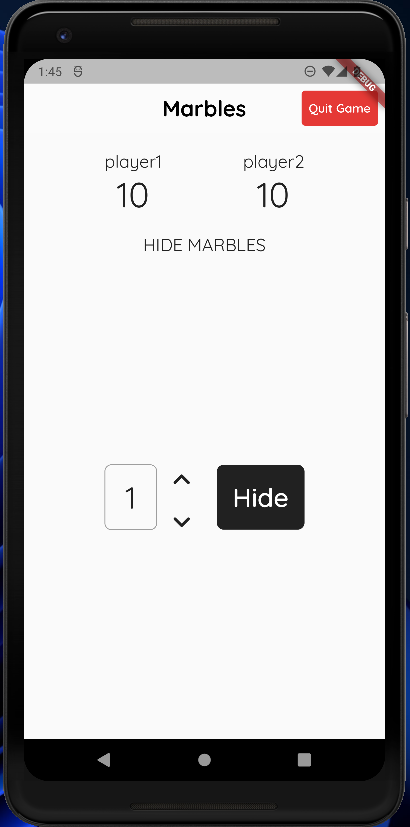
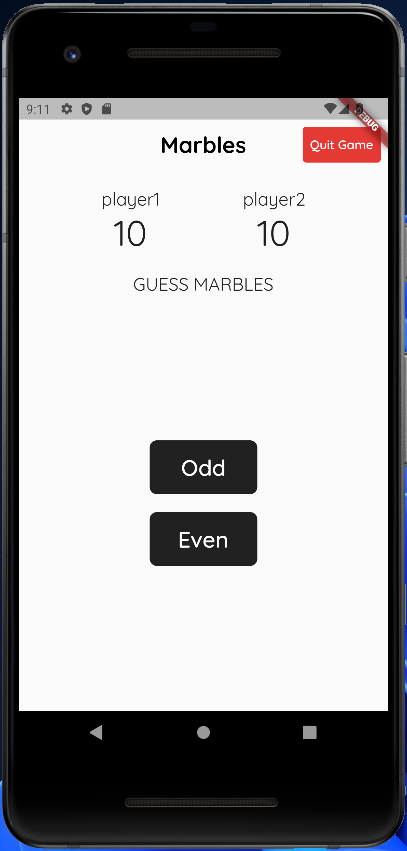
HIDE, we display the_marbleCountwidget with the Hide button. If it'sBET, we display the_marbleCountwidget with the Bet button. Finally, if it'sGUESSwe display the Odd and Even buttons. When the user presses any of the aforementioned buttons we send the corresponding requests namely_hide,_betand_guessrespectively with the correct payload.
- we display the stakes of both players using the
- If it's not the user's turn, we display the current stakes and display the message: "Waiting for
<the other player>to<hide, bet or guess depending on the current move >marbles". - If the game is in
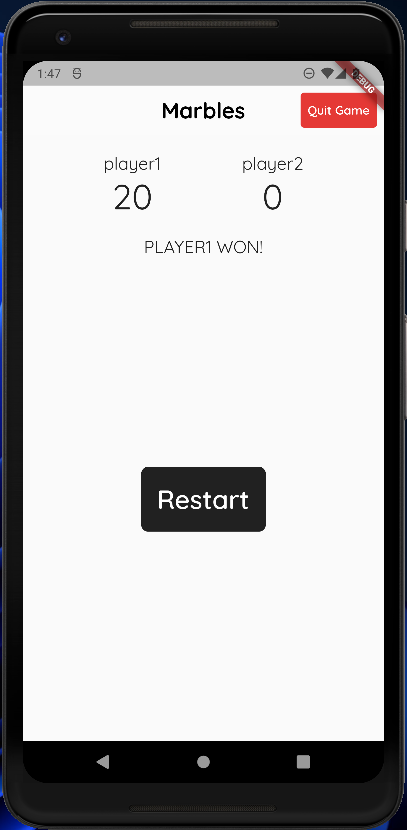
ENDEDstate and there is a winner, we display the final stakes, the name of the winning player and the restart game button which when pressed sends the_restartrequest. - If none of the above cases satisfy, it means someone has left the game so we simply display "Player 2 quit the game".
That's the build method done. We extracted the widgets _stakes and _marbleCount to clean up the code. The _stakes widget is straightforward. It simply displays the usernames of the players playing the game and their stakes.
- The
_marbleCountwidget takes the move name as its parameter to display either the Hide button or the Bet button. It has a container that displays the current marble count that the user wants to either guess or bet. This count comes from ourcountstate variable. It also has twoIconButtons that increase or decrease this count. The count can reach a minimum of one and can't exceed the number of marbles in the player's stake. Sincecountis updated within thesetStatemethod, the widget tree is rebuilt with the updated count and the user sees either an incremented or decremented count.
That's it! You can now build and test your application. Feel free to customize the UI and make it look like you want it to.
GitHub Repo
You can find the full source code here.
Screenshots
Home page
 Hide
Hide
 Guess
Guess
Winner
Gif
If you found this tutorial useful, please consider following and leaving feedback. You can reach out to me at:


