Build Squid Game's marble guessing game using Spring Boot and WebSocket

In this tutorial, we'll build a marble guessing game inspired by the Squid Game TV series using Spring Boot and WebSocket. We'll have a single server that stores all the games in memory. The clients will update the game state using REST API calls and will listen to the changes in the game state via WebSocket using the STOMP protocol.
Rules
- It is a two-player game with each player having ten marbles in their stake in the beginning.
- Each round, a player acts as the hider while the other acts as the guesser.
- Hider hides a non-zero number of marbles from their stake.
- Guesser secretly bets a non-zero number of marbles from their stake and guesses whether the hider's marbles are odd or even.
- If the guesser guessed correctly, the hider must give the guesser marbles equal to the number of marbles the guesser bet.
- If the guesser guessed incorrectly, they must give the hider marbles equal to the number of marbles they hid.
- Roles switch every round.
- Objective is to win all the marbles of the opponent.
Initializing the project
Head to spring initializer and :
- Create a Gradle project. Choosing Gradle or Maven is an individual choice. I prefer Gradle because of its less verbose dependency management.
- Choose Java as your language of choice and the latest stable spring boot version.
- Enter the project metadata i.e. the group, artifact, name, description, package name or leave them as default.
- Choose Jar as the packaging and Java version 17 as its latest LTS version of Java.
- Add dependencies :
- Spring Web, to create the API.
- WebSocket, to notify listeners of state changes.
- Lombok, for logs.
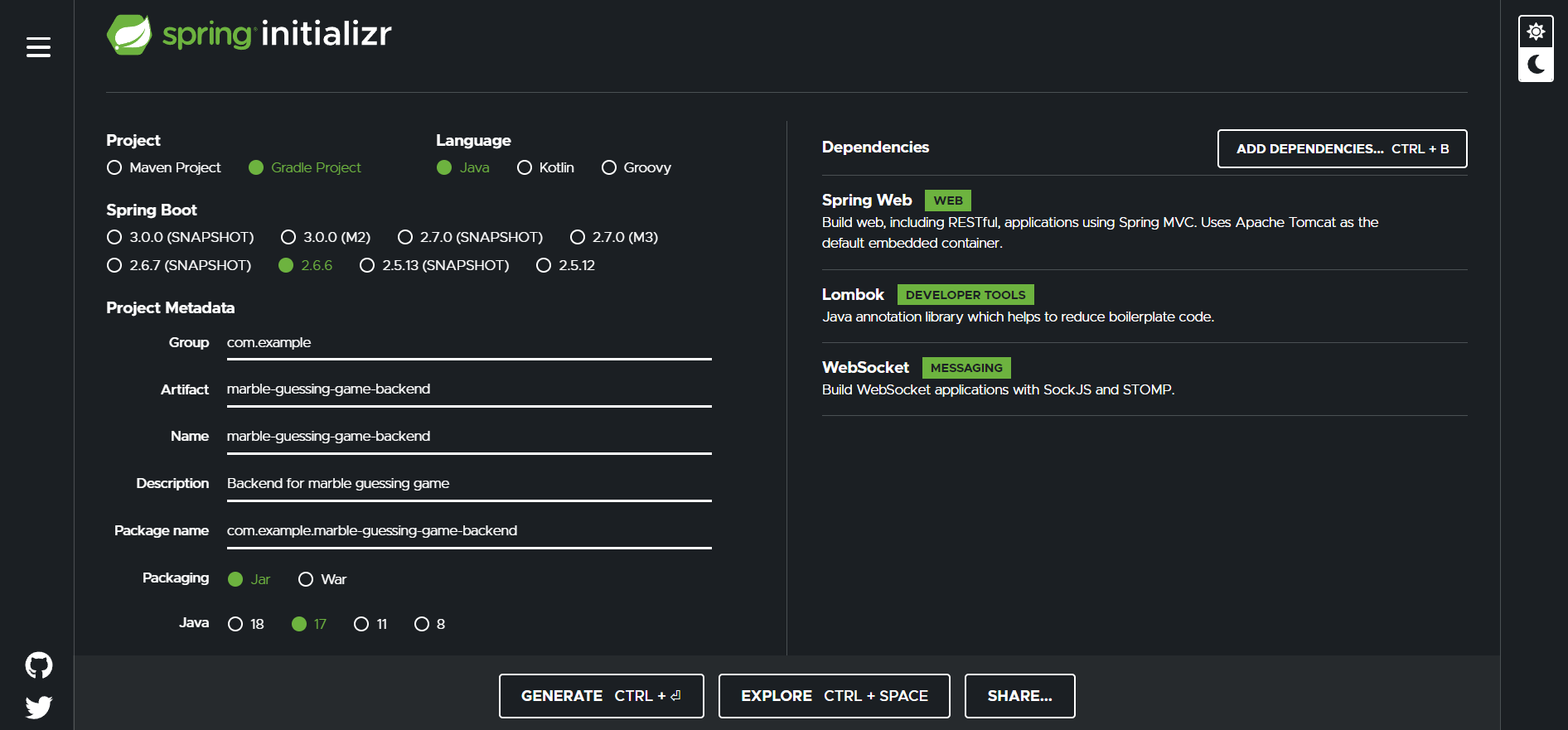
Once you're done, click on generate button and extract the project to a location of your choosing.
Create Model Classes
We can now begin writing the code for our server by creating the model classes. So we create a new package in the classpath and name it model. Our model package will consist of 1 class i.e. Game.java and 3 Enums (GameStatus.java, Move.java and Turn.java) to describe the game state.
Game.java
@Data
public class Game {

  private String gameId;
  private GameStatus status;
  private String player1;
  private String player2;
  private int stake1;
  private int stake2;
  private Turn turn;
  private Move move;
  private int hidden;
  private int bet;
  private String winner;

  public Game(String gameId, String player1) {
    this.gameId = gameId;
    this.player1 = player1;
    status = GameStatus.NEW;
    move = Move.HIDE;
    turn = Turn.PLAYER_1;
  }
}
The
@Dataannotation from Lombok provides boilerplate code likeGetters,Setters,RequiredArgsConstructor,EqualsAndHashcodeandToStringfor our class.Each game will have an id which will be a randomly generated
UUID.GameStatusis an Enum that describes the status of the game which can beNEW,IN_PROGRESSorENDED.
public enum GameStatus {
  NEW,
  IN_PROGRESS,
  ENDED
}
- Strings
player1andplayer2store the usernames of the players currently playing the game. - Integers
stake1andstake2store the number of marbles held by players one and two respectively. - Turn is an Enum that stores whose turn is it currently. It can be either
PLAYER_1orPLAYER_2.
public enum Turn {
  PLAYER_1,
  PLAYER_2,
}
- Move is an Enum that describes the current move. It can be
HIDE,BETorGUESS.
public enum Move {
  HIDE,
  BET,
  GUESS,
}
- Integers
hiddenandbetstore the number of marbles hidden and bet by the players in that round. - String
winnerstores the name of the winner after the game has ended and otherwise remains null.Create Game Registry
The game registry stores information about all the games. Players can join an existing game by providing the id of a game that exists in the registry or start a new game. It will be updated after every game state change so that both the players see the updated state. - Create a new package and name it
service. - Create a new class
GameRegistry.javain the service package.
GameRegistry.java
@Component
public class GameRegistry {

  private static ConcurrentHashMap<String, Game> games;

  private GameRegistry() {
    GameRegistry.games = new ConcurrentHashMap<>();
  }

  public Map<String, Game> getGames() {
    return GameRegistry.games;
  }

  public void addGame(Game game) {
    games.put(game.getGameId(), game);
  }

  public void removeGame(Game game) {
    games.values().remove(game);
  }
}
- The
@Componentannotation is a stereotypical spring bean annotation that enables our class to be auto scanned and instantiated by the spring framework when the application is run. - Our games will be stored in a
static HashMapand the class is a singleton class such that only one instance of the game registry is present in the application and all the games are stored in a single location. - This means that all the state changes will be updated in a single location and both the players will see the same game state at all times.
- The
addGameandremoveGamemethods allow us to add and remove games from the registry. ThegetGamesmethod gives us all the games that are stored on the server.WebSocket Configuration
We will broadcast the game state updates via WebSockets. This way all the clients listening to that endpoint will be notified about the updated game state at the same time and both the clients will be in sync. - Create a new
configpackage and add classWebSocketConfig.javain it.
@EnableWebSocketMessageBroker
@Configuration
public class WebSocketConfig implements WebSocketMessageBrokerConfigurer {

  @Override
  public void registerStompEndpoints(StompEndpointRegistry registry) {
    registry.addEndpoint("/game").setAllowedOrigins("*").withSockJS();
  }

  @Override
  public void configureMessageBroker(MessageBrokerRegistry registry) {
    registry.setApplicationDestinationPrefixes("/app").enableSimpleBroker("/topic");
  }

}
- The
@EnableWebSocketMessageBrokerenables broker-backed messaging over WebSocket using a higher-level messaging sub-protocol. - The
@Configurationis another stereotype spring bean annotation that is used to define configuration classes. - Clients will connect to the WebSocket at
http://localhost:8080/gamevia aSTOMP clientusingSockJS. STOMPis a subprotocol over WebSocket that allows clients to communicate with anySTOMPmessage broker to provide easy and widespread messaging interoperability among many languages, platforms and brokers.Create the API
Clients will communicate with the server to update the game state through a REST API. To define the endpoints, create a new packagecontrollerand addGameAPI.javaclass to it. The methods in the GameAPI.java are mapped to the endpoints defined and forward the handling to the service class that we'll define now. Add a new classGameService.javato theservicepackage. Therefore we have two new classes :
GameAPI.java
@RequiredArgsConstructor
@RequestMapping("/api/v1")
@RestController
public class GameAPI {

  private final GameService gs;
  private final GameRegistry gr;

}
@RequiredArgsConstructoris a Lombok annotation that provides constructor injection for fields defined as final.@RequestMappingdefines the base path at which requests will be served. Therefore our requests will be served atlocalhost:8080/api/v1/*.- We'll need instances of
GameServiceandGameRegistryfor our handlers so we define them here.
GameService.java
@Slf4j
@RequiredArgsConstructor
@Service
public class GameService {

  private final GameRegistry games;
  private final SimpMessagingTemplate mt;

}
@Slf4jannotation is a Lombok annotation that allows us to write logs in the class.- The
SimpMessagingTemplateprovides methods for sending messages to users that are listening to a specific endpoint on a WebSocket.
Get all games
Add the following code to the GameAPI.java class.
@GetMapping()
public ResponseEntity<Object[]> getAllGames() {
    var games = gr.getGames();

    return ResponseEntity.ok(games.values().toArray());
  }
- The
@GetMappingannotation maps the method to incomingHTTP GETrequests. - This method will send a response containing a list of all the games.
For further mappings we'll first define a method in GameService.java class and then define the mapping in GameAPI.java class.
Create game
In GameService.java
public String startGame(String player1) {
    var game = new Game(UUID.randomUUID().toString(), player1);
    log.info("{} started a new game: {}", player1, game.getGameId());
    games.addGame(game);

    return player1 + " started a new game: " + game.getGameId();
  }
- Here we create a new Game object with a randomly generated UUID, log it and then store it in the games registry.
- The Game constructor creates a new Game object with
player1name as the username of the user sending the request and updates the game state to a new game.
In GameAPI.java
@PostMapping("/create")
  public ResponseEntity<String> createGame(HttpServletRequest request) {
    var player = request.getHeader("player");
    if (player == null || player.isBlank())
      return ResponseEntity.badRequest().body("player header is missing");
    var response = gs.startGame(player);

    return ResponseEntity.ok(response);
  }
- Create a mapping that listens to
HTTP POSTrequests on/create. So the complete URL becomeshttp://localhost:8080/api/v1/create. - We need the username of the player as a header and return an error response if it's not present.
- If the request is valid we call the
startGamemethod of the service class and return the response containing thegameId.
Better Error Responses
Before we define further mappings we need to create some classes that will provide better error responses when an exception is thrown by any method of our service class. This will prevent our server from crashing and provide better error messages for the users and help them in debugging.
Create a new package called exception three new classes to it GameException.java, Error.java and ExceptionController.java to it.
GameException.java
public class GameException extends RuntimeException{
  public GameException(String message) {
    super(message);
  }
}
- We'll provide a message in our Exception to give a clear idea of what went wrong.
Now let's define an object that will carry the information about the error.
Error.java
@Getter
public class Error {
  private HttpStatus status;
  private Instant timestamp;
  private String message;

  private Error() {
    timestamp = Instant.now();
  }

  public Error(HttpStatus status, String message) {
    this();
    this.status = status;
    this.message = message;
  }
}
- Our error will contain an HTTP status code, a timestamp and a debug message.
- The
@Getterannotation is a Lombok annotation that provides getters for this class.
Now we'll define a controller that will listen to the exception and send the response. ExceptionController.java
@ControllerAdvice
public class ExceptionController {

  @ExceptionHandler(GameException.class)
  public ResponseEntity<Error> exception(GameException e) {
    Error error = new Error(HttpStatus.BAD_REQUEST, e.getMessage());

    return ResponseEntity.badRequest().body(error);
  }
}
@ControllerAdviceis another spring bean annotation the defines a special component class.
Now that we have defined and handled our custom exception, we can continue to define further mappings.
Join game
Players can join a game by providing the gameId for that game. If the game exists and it's in NEW game state then the player can join the game.
In GameService.java
public Game joinGame(String gameId, String player2) {
    if (!games.getGames().containsKey(gameId)) {
      log.error("Game: {} does not exist", gameId);
      throw new GameException("Game: " + gameId + " does not exist");
    }
    var game = games.getGames().get(gameId);
    if (game.getStatus().equals(GameStatus.NEW)) {
      game.setPlayer2(player2);
      game.setStatus(GameStatus.IN_PROGRESS);
      game.setStake1(10);
      game.setStake2(10);
      games.addGame(game);
      log.info("Player: {} joined game: {}", player2, gameId);

      mt.convertAndSend("/topic/gamestate/" + gameId, game);
      return game;
    } else {
      log.error("Game: {} is already in progress", gameId);
      throw new GameException("Game: " + gameId + " is already in progress");
    }
  }
- We check if the game exists with the
gameIdprovided and fetch it. If it does not exist we throw our custom exception. - We check if the game is a new game, add the player to the game, update the game state, update the registry and notify the listeners that are listening to the updates of this game on
/topic/gamestate/{gameId}.
In GameAPI.java
@PostMapping("/join/{gameId}")
  public ResponseEntity<Object> joinGame(HttpServletRequest request, @PathVariable String gameId) {
    var player = request.getHeader("player");
    if (player == null || player.isBlank())
      return ResponseEntity.badRequest().body("player header is missing.");
    var response = gs.joinGame(gameId, player);

    return ResponseEntity.ok(response);
  }
gameIdis provided by the user as a path variable.
Hide marbles
When it's a player's turn to hide they will send the number of marbles they want to hide along with the gameId of the game they are playing. We'll check if they have played the correct move in the correct turn and then update the game state. Keep in mind that the players must hide a minimum of one marble and they can't hide more marbles than what they have in their stake.
In GameService.java
public String hide(int hide, String gameId, String player) {
    if (!games.getGames().containsKey(gameId)) {
      log.error("Game: {} does not exist", gameId);
      throw new GameException("Game: " + gameId + " does not exist");
    }
    var game = games.getGames().get(gameId);
    if (!game.getStatus().equals(GameStatus.IN_PROGRESS)) {

      log.error("Game: {} is not in progress", game.getGameId());
      throw new GameException("Game: " + gameId + " is not in progress");
    }
    var move = game.getMove();
    if (!move.equals(Move.HIDE)) {
      log.error("Invalid move. Current move is: {}", move);
      throw new GameException("Invalid move. Current move is: " + move);
    }
    var turn = game.getTurn();
    var expectedPlayer = turn == Turn.PLAYER_1 ? game.getPlayer1() : game.getPlayer2();
    if ((turn.equals(Turn.PLAYER_1) && !game.getPlayer1().equals(player))
        || (turn.equals(Turn.PLAYER_2) && !game.getPlayer2().equals(player))) {
      log.error("Invalid turn. Waiting for player: {} to play", expectedPlayer);
      throw new GameException("Invalid turn. Waiting for " + expectedPlayer + " to play");
    } else {
      var stake = turn.equals(Turn.PLAYER_1) ? game.getStake1() : game.getStake2();
      if (hide > stake || hide <= 0) {
        log.error("Can only hide marbles >0 and <= {}", stake);
        throw new GameException("Invalid count. Can only hide marbles >0 and <=" + stake);
      } else {
        game.setHidden(hide);
        game.setTurn(turn.equals(Turn.PLAYER_1) ? Turn.PLAYER_2 : Turn.PLAYER_1);
        game.setMove(Move.BET);
        games.addGame(game);
        log.info("Player: {} hid {} marbles", player, hide);

        mt.convertAndSend("/topic/gamestate/" + gameId, game);
        return player + " hid: " + hide + " marbles";
      }
    }
  }
- We check if the game exists.
- Check if the game is in progress.
- Check if the current move is Hide.
- Check if the player is playing when it's their turn to play.
- Check the stake of the player to prevent an invalid number of marbles.
- Update the game state.
- Update the games registry.
- Notify the listeners.
In GameAPI.java
@PostMapping("/{gameId}/hide")
  public ResponseEntity<String> hide(HttpServletRequest request, @PathVariable String gameId,
      @RequestBody MarbleCount mc) {
    var player = request.getHeader("player");
    if (player == null || player.isBlank())
      return ResponseEntity.badRequest().body("player header is missing.");
    int hide = mc.getCount();
    var response = gs.hide(hide, gameId, player);

    return ResponseEntity.ok(response);
  }
- To get the marble count from the user we have defined an object of
MarbleCountas the request body. - User will send a JSON payload in the following manner along with the request and spring boot will then convert that payload into an object of
MarbleCountclass.
Payload
{
    "count": <integer>
}
We'll define the MarbleCount.java class in a new dto package.
@Data
public class MarbleCount {
  private int count;
}
- Integer
countcontains the number of marbles the player wants to hide.
Bet marbles
This is very similar to hiding marbles except this time player bets marbles instead of hiding them.
In GameService.java
public String bet(int bet, String gameId, String player) {
    if (!games.getGames().containsKey(gameId)) {
      log.error("Game: {} does not exist", gameId);
      throw new GameException("Game: " + gameId + " does not exist");
    }
    var game = games.getGames().get(gameId);

    if (!game.getStatus().equals(GameStatus.IN_PROGRESS)) {

      log.error("Game: {} is not in progress", game.getGameId());
      throw new GameException("Game " + gameId + " is not in progress");
    }

    var move = game.getMove();
    if (!move.equals(Move.BET)) {
      log.error("Invalid move. Current move is: {}", move);
      throw new GameException("Invalid move. Current move is: " + move);
    }

    var turn = game.getTurn();
    var expectedPlayer = turn == Turn.PLAYER_1 ? game.getPlayer1() : game.getPlayer2();
    if ((turn.equals(Turn.PLAYER_1) && !game.getPlayer1().equals(player))
        || (turn.equals(Turn.PLAYER_2) && !game.getPlayer2().equals(player))) {
      log.error("Invalid turn. Waiting for player: {} to play", expectedPlayer);
      throw new GameException("Invalid turn. Waiting for " + expectedPlayer + " to play");
    } else {
      var stake = turn.equals(Turn.PLAYER_1) ? game.getStake1() : game.getStake2();
      if (bet > stake || bet <= 0) {
        log.error("Can only bet marbles >0 and <= {}", stake);
        throw new GameException("Invalid count. Can only bet marbles >0 and <=" + stake);
      } else {
        game.setBet(bet);
        game.setMove(Move.GUESS);
        games.addGame(game);
        log.info("Player: {} bet {} marbles", player, bet);

        mt.convertAndSend("/topic/gamestate/" + gameId, game);
        return player + " bet: " + bet + " marbles";
      }
    }
  }
In GameAPI.java
@PostMapping("/{gameId}/bet")
  public ResponseEntity<String> bet(HttpServletRequest request, @PathVariable String gameId,
      @RequestBody MarbleCount mc) {
    var player = request.getHeader("player");
    if (player == null || player.isBlank())
      return ResponseEntity.badRequest().body("player header is missing.");
    int bet = mc.getCount();
    var response = gs.bet(bet, gameId, player);

    return ResponseEntity.ok(response);
  }
Guess marbles
After the guesser bets their marbles they need to guess whether the hider hid an odd number of marbles or an even number of marbles. The guess is sent as a JSON payload along with the gameId and player name header as usual.
In GameService.java
This method will contain the main logic of our game where we check if the player has guessed correctly and check if somebody has won the game or not. So we need to define three methods.
Check if the guess was correct
private Boolean isCorrectGuess(Game game, String guess) {
    if (game.getHidden() % 2 == 0) {
      if (guess.equals("EVEN"))
        return true;
      else
        return false;
    } else {
      if (guess.equals("ODD"))
        return true;
      else
        return false;
    }
  }
Check if somebody won
private Turn didWin(Game game) {
    if (game.getStake1() <= 0)
      return Turn.PLAYER_2;
    if (game.getStake2() <= 0)
      return Turn.PLAYER_1;
    else
      return null;
  }
Guess method
This is a bulky chunk of code as it contains our main game logic.
  public String guess(String gameId, String player, String guess) {
    if (!games.getGames().containsKey(gameId)) {
      log.error("Game: {} does not exist", gameId);
      throw new GameException("Game: " + gameId + " does not exist");
    }
    var game = games.getGames().get(gameId);

    if (!game.getStatus().equals(GameStatus.IN_PROGRESS)) {

      log.error("Game: {} is not in progress", game.getGameId());
      throw new GameException("Game: " + gameId + " is not in progress");
    }

    var move = game.getMove();
    if (!move.equals(Move.GUESS)) {
      log.error("Invalid move. Current move is: {}", move);
      throw new GameException("Invalid move. Current move is: " + move);
    }

    var turn = game.getTurn();
    var expectedPlayer = turn == Turn.PLAYER_1 ? game.getPlayer1() : game.getPlayer2();
    if ((turn.equals(Turn.PLAYER_1) && !game.getPlayer1().equals(player))
        || (turn.equals(Turn.PLAYER_2) && !game.getPlayer2().equals(player))) {
      log.error("Invalid turn. Waiting for player: {} to play", expectedPlayer);
      throw new GameException("Invalid turn. Waiting for " + expectedPlayer + " to play");
    } else {
      var isCorrect = isCorrectGuess(game, guess);
      if (isCorrect) {
        // Correct guess
        if (turn.equals(Turn.PLAYER_1)) {
          game.setStake1(game.getStake1() + game.getBet());
          game.setStake2(game.getStake2() - game.getBet());
          log.info("Player: {} guessed correctly", player);
        } else {
          game.setStake2(game.getStake2() + game.getBet());
          game.setStake1(game.getStake1() - game.getBet());
          log.info("Player: {} guessed correctly", player);
        }
      } else {
        if (turn.equals(Turn.PLAYER_1)) {
          game.setStake1(game.getStake1() - game.getHidden());
          game.setStake2(game.getStake2() + game.getHidden());
          log.info("Player: {} guessed incorrectly", player);
        } else {
          game.setStake2(game.getStake2() - game.getHidden());
          game.setStake1(game.getStake1() + game.getHidden());
          log.info("Player: {} guessed incorrectly", player);
        }
      }

      var winner = didWin(game);
      if (winner != null) {
        game.setStatus(GameStatus.ENDED);
        if (winner.equals(Turn.PLAYER_1)) {
          game.setWinner(game.getPlayer1());
          game.setStake1(20);
          game.setStake2(0);
          games.addGame(game);
          log.info("Player: {} won the game", game.getPlayer1());

          mt.convertAndSend("/topic/gamestate/" + gameId, game);
          return winner + " won the game";
        } else {
          game.setWinner(game.getPlayer2());
          game.setStake2(20);
          game.setStake1(0);
          games.addGame(game);
          log.info("Player: {} won the game", game.getPlayer2());

          mt.convertAndSend("/topic/gamestate/" + gameId, game);
          return winner + " won the game";
        }
      } else {
        game.setHidden(0);
        game.setBet(0);
        game.setMove(Move.HIDE);
        games.addGame(game);

        mt.convertAndSend("/topic/gamestate/" + gameId, game);
        var result = isCorrect ? "correctly" : "incorrectly";
        return player + " guessed " + result;
      }
    }
  }
- We perform the necessary checks for
gameId, turn and move. - Check if the guess was correct or not.
- Updates stakes for both players based on the last check.
- If somebody won the game, update the winner else continue to the next round.
- Update game state.
- Update the games registry.
- Notify listeners.
In GameAPI.java
@PostMapping("/{gameId}/guess")
  public ResponseEntity<String> guess(HttpServletRequest request, @PathVariable String gameId, @RequestBody Guess g) {
    var player = request.getHeader("player");
    if (player == null || player.isBlank())
      return ResponseEntity.badRequest().body("player header is missing.");
    var guess = g.getGuess();
    var response = gs.guess(gameId, player, guess);

    return ResponseEntity.ok(response);
  }
- User sends the guess as a payload that is converted to a Guess object as defined in the
Guess.javaclass in thedtopackage.
Payload
{
    "guess":  <"EVEN" or "ODD">
}
Guess.java
@Data
public class Guess {
  private String guess;
}
Almost there. Our players can now :
- Create games.
- Join a game.
- Hide marbles.
- Bet marbles.
- Guess marbles.
Now all that's left to do is allow our players to quit the game or restart a game.
Restart game
After the game has ended, either player can send a request to restart the game.
In GameService.java
public String restartGame(String gameId, String player) {
    if (!games.getGames().containsKey(gameId)) {
      log.error("Game: {} does not exist", gameId);
      throw new GameException("Game: " + gameId + " does not exist");
    }
    var game = games.getGames().get(gameId);
    if (!player.equals(game.getPlayer1()) && !player.equals(game.getPlayer2())) {
      log.error("Can't restart game: {} as player: {} is not playing", gameId, player);

      throw new GameException("Can't restart as " + player + " is not playing the game: " + gameId);
    }
    game.setStatus(GameStatus.IN_PROGRESS);
    game.setStake1(10);
    game.setStake2(10);
    game.setTurn(Turn.PLAYER_1);
    game.setMove(Move.HIDE);
    game.setHidden(0);
    game.setBet(0);
    game.setWinner(null);
    games.addGame(game);
    log.info("Restarting game: {}", gameId);

    mt.convertAndSend("/topic/gamestate/" + gameId, game);
    return player + " restarted game: " + gameId;
  }
- We check if the restart game request is from either player playing the game.
- Update the game state.
- Update the registry.
- Notify the listeners.
In GameAPI.java
@PostMapping("/{gameId}/restart")
  public ResponseEntity<String> restart(HttpServletRequest request, @PathVariable String gameId) {
    var player = request.getHeader("player");
    if (player == null || player.isBlank())
      return ResponseEntity.badRequest().body("player header is missing.");
    var response = gs.restartGame(gameId, player);

    return ResponseEntity.ok(response);
  }
Similarly for quit game...
Quit game
Players can send the quit game request at any point in the game.
In GameService.java
public String quitGame(String gameId, String player) {
    if (!games.getGames().containsKey(gameId)) {
      log.error("Game: {} does not exist", gameId);
      throw new GameException("Game: " + gameId + " does not exist");
    }
    var game = games.getGames().get(gameId);
    if (player.equals(game.getPlayer1()) || player.equals(game.getPlayer2())) {
      log.info("Player: {} quit the game", player);
      game.setStatus(GameStatus.ENDED);
      game.setWinner(null);
      games.removeGame(game);

      mt.convertAndSend("/topic/gamestate/" + gameId, game);
      return player + " quit game: " + gameId;
    } else {
      log.error("Player: {} is not playing game: {}", player, gameId);
      throw new GameException(player + " is not playing the game: " + gameId);
    }
  }
- Check if the quit game request is from a player playing the game.
- Update the game status to
ENDED. - Update the winner to null because if the quit game request is sent after somebody has won the game then we need to differentiate between the states of game won and game quit.
- Update registry and notify listeners.
There. You've done it. Congratulations for making it to the end. You now have a fully functioning web server for your game which you can test.
Resources
- GitHub repo.
- Postman collection to test the API.
NOTE : The postman collection only contains HTTP requests for the server. To test the Websocket you'll need to create a client that connects to the WebSocket endpoint and listens to the particular topic. You can still test the game state changes without connecting to the Websocket but you will have to send the get all games request after every request to check if the state updated or not.
Check out this article on building the front-end for our app using Flutter.
If you found this tutorial useful, please consider leaving feedback. You can reach out to me at: